


Vidy-Real-Time AI Model
4.240.00 Reviews
App Specs
- Version
- 1.3.2
- Updated On
- License
- Free
- Downloads
- 10,000+
- Developer
- SILICONWORLD PTE. LTD.
- Categories
- Entertainment
- Platform
- Android
Screenshots


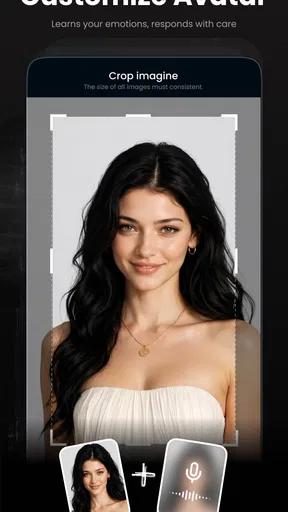
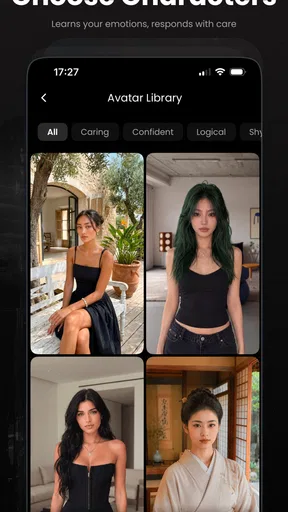
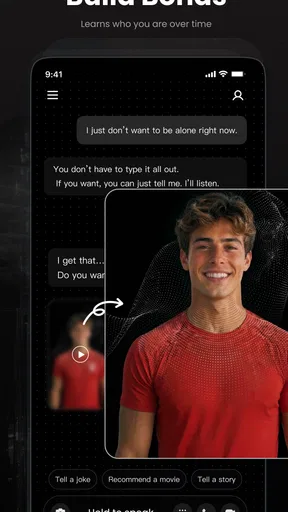
 Analysis by AppCompare
Vidy is an entertainment app built around a real-time generative AI model, and I found its appeal easiest to understand when I stopped treating it like a conventional video player or a standard editing tool. Its purpose is to let you explore AI-generated visual ideas as they develop, rather than simply selecting from a fixed library of finished clips. That makes the first few minutes feel more like an experiment than a typical watch-and-scroll session.
I would recommend approaching it with a small, clear idea in mind. A simple visual concept gives you a better starting point than an ambitious request with many conditions. If you are curious about generative media, want to play with visual concepts, or enjoy entertainment apps that respond to your input, Vidy is worth trying. If you want a large catalog of completed shows, precise professional editing, or predictable output every time, the usual streaming and editing alternatives will probably suit you better.
What to expect from Vidy
The first thing I noticed is that Vidy is not trying to replace a familiar streaming service. A streaming app gives me a finished selection and asks me to choose what to watch. Vidy is more interactive: the attraction is the process of seeing an AI model turn an idea into something visual in real time. That difference matters because the experience depends more on curiosity and willingness to refine an idea than on finding a perfect title immediately.
The app sits in the entertainment category, but I would describe it as an experimental creative playground rather than a passive viewing platform. I can imagine using it during a short break to test a visual thought, sharing the result with friends, or using it to explore the mood of a scene before deciding whether the idea is worth developing elsewhere. The strongest moments come from discovery, not from expecting studio-level consistency.
Vidy is free to install, which makes the initial trial fairly easy to justify. It is marked for everyone, so its presentation is intended to be broadly accessible. At the same time, the app includes in-app purchases ranging from around forty dollars to around one hundred dollars per item. That is an important distinction: trying the app costs nothing at the starting point, but some deeper or extended use may involve a substantial purchase. I would inspect any purchase screen carefully before confirming anything.
The app comes from SILICONWORLD PTE. LTD. and has reached over ten thousand installs, with a 4.2 average from roughly two hundred ratings. Those figures suggest that it has attracted a modest but interested audience, while also leaving room for different experiences between users. I would not treat the rating as a guarantee of identical results on every device or with every idea; generative apps can feel very different depending on what the user asks them to do.
Its current version is 1.3.2 and it requires at least iOS or Android version 11. That system requirement is worth checking before installation, especially if you are using an older phone or tablet. A compatible device is only the first step, though. Because the app is centered on real-time generation, I would also begin with a stable connection and enough battery for an exploratory session rather than opening it when I am already rushing out the door.
Worth Reading Before You Choose

Switching to Android Auto Means Rethinking Your Driving Routine

Google Calendar Makes a Crowded Week Easier to Manage

Baby Panda World Brings Quick Play to Modern Phones, but Its Game Library Feels Busy

ESPN’s Live Game View Makes Following Close Games Easier

QuizzLand Review: A Good Fit for Short Trivia Breaks, Not Every Player

Basketball Stars: Multiplayer Is Fast, but Can It Recover When Matches Go Wrong?
Why the real-time approach changes the experience
With ordinary entertainment apps, waiting usually means loading a file or buffering a finished stream. In Vidy, the waiting is part of the creative process. I found that this changes my expectations: I pay attention to how an idea develops instead of judging the app only by whether the first result looks exactly like the picture in my head.
That also creates a trade-off. Real-time generation feels more engaging than browsing a static collection, but it can be less predictable than selecting a pre-made clip. A vague request may produce something interesting without being especially useful. A highly detailed request may still need adjustment. The best mindset is to treat the first result as a draft or visual prompt for the next attempt, not necessarily as the final answer.
Getting started without unnecessary friction
For a first session, I would keep the setup deliberately simple. Install Vidy on a supported device, open it, and give yourself a few uninterrupted minutes to understand the main interaction before trying to create something elaborate. The goal is not to test every possibility immediately; it is to reach one satisfying result and learn how the app responds to your wording.
I recommend preparing one short concept before opening the app. For example, instead of starting with a long description involving several characters, locations, camera movements, colors, and story events, begin with one subject and one atmosphere. A prompt such as “a quiet neon street after rain” is easier to evaluate than a paragraph that asks for a complete cinematic sequence. This is one of the most useful habits I found: make the first request easy to judge.
If the opening screen presents several choices, I would avoid tapping through them too quickly. Look for the place where your idea is entered or where generation begins, then identify what changes after you submit it. The important questions are practical: does the app show progress, can you revise the idea, and does the result remain visible while you decide what to do next? Learning that flow early makes later experiments much less confusing.
A good first-session routine is to make one broad attempt, notice the strongest part of the result, and then narrow the next request around that part. If the atmosphere works but the subject is wrong, change the subject rather than rewriting everything. If the subject works but the scene feels too busy, simplify the setting. This approach is more efficient than starting from scratch each time because it teaches you which part of your wording is influencing your experience.
I would also avoid making a purchase during the first few minutes. The free entry point is enough to decide whether the style of interaction suits you. Since individual in-app items can be expensive, I would first establish a real use case: casual entertainment, visual brainstorming, or repeated experimentation. If you only want to try one novelty effect, paying for a larger option may not make sense.
Reaching the first meaningful result
My preferred first test is a familiar everyday scenario: I imagine sitting with a friend and wanting to show them a visual version of an idea that is difficult to explain. Rather than describing an entire story, I start with a single scene and a clear mood. I then watch the generation, decide what feels closest to the idea, and refine only one detail. That makes the result feel like a conversation with the model instead of a test I can either pass or fail.
For a first meaningful action, choose a concept where variation is acceptable. A dreamlike environment, a playful setting, or an unusual combination of colors works better than a request that demands exact text, precise branding, or a technically accurate diagram. Generative entertainment is strongest when interpretation is part of the fun. It is less comfortable when accuracy is the entire point.
One non-obvious advantage of this workflow is that it helps me separate creative direction from technical perfection. I can use Vidy to decide whether a mood feels right before I spend time producing something more polished in another tool. In that role, the app is not competing directly with a full editor. It is helping me answer an earlier question: “Is this visual idea interesting enough to pursue?”
Another useful habit is to keep a mental record of what changed between attempts. If a result improves after removing several adjectives, that tells me the model responds better to a cleaner direction in that situation. If adding a location changes the whole mood, I know the setting is carrying more weight than expected. These observations are more valuable than endlessly adding descriptive words because they teach me how to communicate with this particular app.
When I use an AI entertainment app, I also want the first success to be repeatable enough to feel encouraging. Vidy does not need to produce the same result twice for the experience to be worthwhile, but I do need to understand what I am controlling. Start with one subject, one place, and one emotional tone. Once that combination produces something you like, experiment with a single change. This creates a clear cause-and-effect loop.
Confusion that can appear during a session
The biggest source of confusion is the difference between an idea and a guaranteed instruction. I may imagine that a detailed sentence will force every visual element to appear exactly as described, but generative systems often interpret rather than obey. In Vidy, I would read unexpected results as a sign to simplify or redirect the request, not automatically as a malfunction.
It is also easy to confuse real-time generation with instant generation. The attraction is that the model works while I am engaged with the process, but that does not mean every request will be immediate or equally smooth. I would allow the app time to respond and avoid repeatedly submitting the same idea just because the first response feels slower than expected. Repeated attempts can make it harder to tell which result came from which instruction.
A second point of friction is judging quality too early. A developing image or scene may look incomplete while it is still being formed. I found it more useful to wait for the app’s response to settle before deciding whether the concept worked. If the final result still misses the point, then I change the wording. This small pause prevents me from reacting to an unfinished stage.
Users may also wonder whether Vidy should be treated as a replacement for familiar entertainment apps. In my view, it should not. A streaming service remains better when I want a known film or series with consistent presentation. A conventional editor remains better when I need exact cuts, reliable text placement, or detailed control over a finished project. Vidy is better when the act of generating and exploring is itself the entertainment.
There is a similar distinction with image and video creation tools designed for production work. Those alternatives may offer more deliberate controls, established timelines, or repeatable workflows. Vidy’s appeal is lighter and more immediate: I can begin with an idea and see where it leads. The trade-off is that I should not expect the same level of manual precision. Choosing between them depends on whether I value surprise or control for the task in front of me.
Practical ways to get more from the app
After the first successful attempt, I would use a three-step refinement method. First, keep the subject fixed and change the atmosphere. Second, keep the atmosphere fixed and change the setting. Third, return to the version that felt strongest and adjust one visual detail. This reveals whether the app is responding mainly to the subject, the mood, or the environment, and it gives me a more reliable way to explore than random trial and error.
A second tip is to use Vidy as a conversation starter. If friends are choosing a theme for a party, planning a small creative project, or simply debating which visual style feels more fun, generating a few contrasting concepts can make the discussion concrete. The app is especially useful when people have different mental pictures but do not yet have a finished brief. Seeing alternatives can expose disagreements that words hide.
A third trade-off concerns time and money. The free installation lowers the barrier to experimentation, but the available in-app items are priced high enough that I would not buy one merely because a single result looks promising. I would first test several kinds of ideas and decide whether Vidy fits a repeated habit. Someone who uses it occasionally for amusement may be satisfied with the initial experience, while a frequent experimenter should think carefully about how purchases fit their budget.
Privacy and personal comfort should guide what I enter as well. I would avoid treating an entertainment generator as the place for sensitive personal material, confidential plans, or information about other people. Even when an app feels casual, the safest workflow is to use fictional concepts and general descriptions unless I have a clear reason to do otherwise. That keeps the experience low-risk and makes the creative goal easier to focus on.
For families, the everyone rating makes Vidy approachable, but I would still explain that AI-generated results can be unpredictable in style and interpretation. Younger users may enjoy the surprise, yet they may also assume the model understands an instruction exactly as a person would. A short explanation that the app is generating possibilities, not guaranteeing a precise drawing, can prevent disappointment and encourage more thoughtful experimentation.
Who will enjoy it, and who should choose something else
I think Vidy is a good match for a curious first-time user who wants a low-pressure way to explore generative visuals. It also suits people who enjoy showing friends unusual ideas, collecting imaginative concepts, or using visual experiments to break through a creative block. The real-time angle gives the process a playful quality that a static gallery cannot provide.
I would be more cautious about recommending it to someone who needs dependable professional output. If your task requires exact wording, consistent characters, controlled composition, or a carefully edited final sequence, a dedicated creation suite is likely the better choice. Vidy can help with inspiration at the beginning of that process, but I would not make it the only tool for work where precision matters.
It may also be the wrong choice for someone who simply wants to relax with familiar entertainment. The app asks for participation, and that is part of its charm. If I am tired and want to press play on a known program, a conventional streaming service is more convenient. Vidy rewards attention and curiosity rather than passive viewing.
Before installing, check that your device runs at least iOS or Android version 11. Once installed, begin with a short visual idea, wait for the generation to develop, and change only one part of the request at a time. That path gives a first-time user a fair impression of the app without spending money or becoming lost in overly ambitious prompts.
My final take after using the experience
Vidy is most convincing as an interactive entertainment experiment, not as a replacement for streaming or professional editing. I like the way its real-time generative approach turns a simple idea into something I can react to immediately. The experience feels approachable when I keep my requests focused, accept that results may vary, and treat each generation as part of a creative conversation.
The main limitations are equally clear. The output can be less predictable than a finished catalog, the learning process depends on refining ideas, and the purchase range deserves careful consideration before anyone commits. Those issues do not cancel out the app’s appeal, but they make the right expectations important.
For a first-time user, my advice is simple: install it only on a supported device, try a small fictional concept, and judge the experience by how enjoyable the exploration feels rather than by whether the first result is perfect. If you like that process, Vidy can become a fun source of visual inspiration and casual entertainment. If you need certainty, repeatability, or finished content on demand, I would choose a more traditional app instead.
Overall, Vidy offers a distinctive way to interact with generative AI without requiring the first session to feel like a technical project. Its best use is helping me move from “I have an idea” to “I can see one possible version of it.” That is a modest goal, but for the right user, it is exactly what makes the app enjoyable.
Pros
- Generates AI video effects and transformations with minimal setup.
- Real-time processing makes previews feel fast and interactive.
- Useful for experimenting with creative video concepts on mobile.
- Can help creators produce engaging short-form content quickly.
- Offers an accessible way to explore AI-powered visual tools.
Cons
- Output quality may vary depending on the source video and lighting.
- Real-time effects can consume battery and make the device warm.
- Some features may require a compatible device or newer operating system.
- AI-generated results may look inconsistent in complex scenes.
- Privacy concerns may arise when uploading personal videos for processing.
FAQs for Vidy-Real-Time AI Model
What is Vidy-Real-Time AI Model, and what can it do?
Vidy-Real-Time AI Model is an artificial intelligence tool designed to process information and generate responses with minimal delay. Depending on the version and platform, it may support tasks such as text generation, visual understanding, content assistance, or interactive AI experiences. Before downloading, users should check the official description because available features can vary by device, region, subscription plan, and app updates.
Does Vidy-Real-Time AI Model require an internet connection?
Yes, users should generally expect to need a stable internet connection. Real-time AI processing is commonly performed through remote servers rather than entirely on the phone, so requests may fail or respond slowly when the connection is weak. Mobile data usage can also increase during frequent sessions, especially if the app handles images, video, audio, or other large files.
Is Vidy-Real-Time AI Model free to download and use?
The application may be available to download without an upfront charge, but that does not always mean every feature is free. Some AI tools limit daily requests, advanced models, processing speed, or media functions behind subscriptions, credits, or in-app purchases. We recommend reviewing the store listing and payment terms carefully before starting a trial, particularly because subscriptions may renew automatically.
How does Vidy-Real-Time AI Model handle privacy and user data?
Users should avoid entering passwords, financial information, private conversations, confidential documents, or sensitive personal details unless the privacy policy clearly explains how that information is protected. AI applications may send prompts, uploaded media, device information, or usage data to their servers for processing and improvement. Check the developer’s policy, permissions, retention practices, and account deletion options before regular use.
What phones and operating systems are compatible with Vidy-Real-Time AI Model?
Compatibility depends on the official release, operating-system version, hardware requirements, and whether the app relies on features such as a modern camera, microphone, neural-processing support, or high-speed connectivity. Older Android and iOS devices may experience slower performance or may not be supported at all. Always confirm the current requirements in the official Google Play or App Store listing before downloading.


